Introduction
tty-web is a web-based terminal emulator that opens a real PTY in the browser over WebSocket.
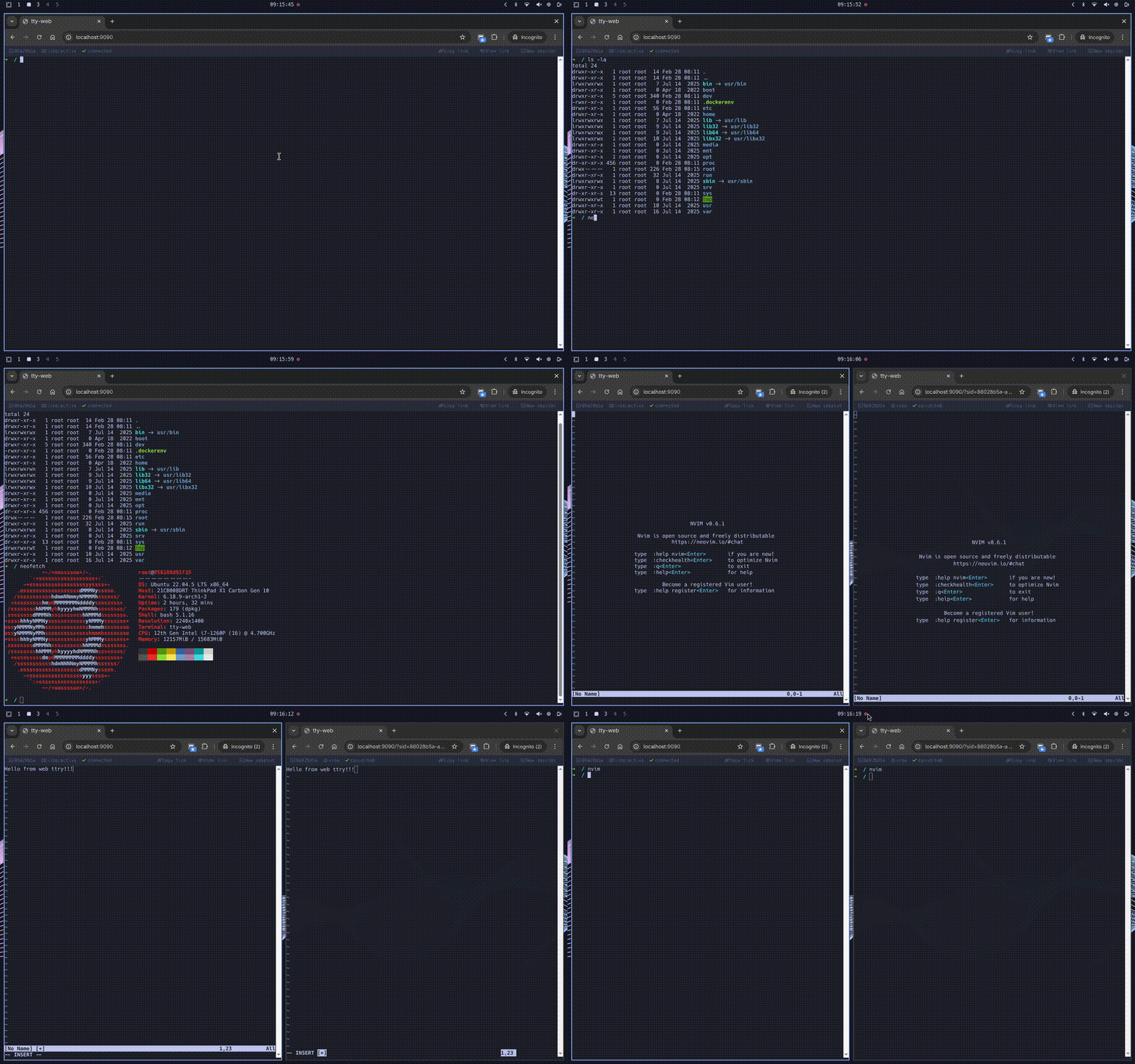
Features
- Real PTY with full job control and signals
- Persistent sessions with configurable scrollback replay
- Session sharing and view mode with window size sync
- Lightweight binary protocol
- Single static binary (frontend embedded via
rust-embed) - Multi-arch Docker images (
amd64/arm64) — minimal scratch and playground variants
Getting Started
Running
tty-web --address 127.0.0.1 --port 9090 --shell /bin/zsh
Then open http://127.0.0.1:9090 in a browser.
CLI Flags
Every flag can also be set via an environment variable.
| Flag | Env | Default | Description |
|---|---|---|---|
--address | TTY_WEB_ADDRESS | 127.0.0.1 | Listen address |
--port | TTY_WEB_PORT | 9090 | Listen port |
--shell | TTY_WEB_SHELL | /bin/bash | Shell to spawn |
--log-level | TTY_WEB_LOG_LEVEL | info | Log level (trace, debug, info, warn, error) |
--log-format | TTY_WEB_LOG_FORMAT | text | Log output format (text, json) |
--pwd | TTY_WEB_PWD | inherited | Working directory for new shell sessions |
--scrollback-limit | TTY_WEB_SCROLLBACK_LIMIT | 256 | Scrollback buffer size in KiB |
Docker
Pre-built images are available for linux/amd64 and linux/arm64 in two variants:
| Variant | Tags | Description |
|---|---|---|
| minimal | latest, <version> | Single static binary (~5 MB), ideal for COPY --from |
| playground | playground, <version>-playground | Ubuntu with Python, Node, Go, Rust, Neovim |
Minimal (default)
Scratch-based image with a single static binary. Use as a source for COPY --from:
COPY --from=ghcr.io/alviner/tty-web:latest /tty-web /usr/local/bin/tty-web
Playground
docker run --rm -p 9090:9090 ghcr.io/alviner/tty-web:playground
Override the default shell:
docker run --rm -p 9090:9090 ghcr.io/alviner/tty-web:playground \
  tty-web --shell /bin/sh
Sessions
Each WebSocket connection is backed by a persistent session identified by a UUID v4. The PTY and shell process live independently of the WebSocket — closing a tab or losing connectivity does not kill the shell.
Reconnect
On first connect the server assigns a UUID and the client updates the browser
URL to /?sid=<uuid> via history.replaceState. On reconnect the client
reads sid from the URL and passes it as a query parameter. The server
replays the scrollback buffer and then streams live output — no gaps. From the
user's perspective the terminal picks up where it left off.
The scrollback is an event log of output chunks and window-size changes.
--scrollback-limit (in KiB, default 256) caps the total byte cost of
stored events. When the budget is exceeded, entire events are evicted from the
front — escape sequences are never split mid-stream. On reconnect the server
replays the log as Output and WindowSize protocol frames followed by a
ReplayEnd marker.
Reconnection uses exponential backoff starting at 1 s up to a maximum of 5 s.
Share a session
Open a second tab with ?sid=<uuid> in the page URL:
http://localhost:9090/?sid=<uuid>
All tabs see the same output and can send input simultaneously. The session ID is printed to the browser console on connect.
View mode
Append &view to a session URL to connect as a read-only observer:
http://localhost:9090/?sid=<uuid>&view
Terminal output is visible but all keyboard input and resize events are ignored.
The viewer's terminal automatically matches the interactive client's window
size — when the interactive client resizes, all viewers receive the updated
dimensions via the 0x13 (Window size) protocol command.
Useful for demos, monitoring, and pair-programming.
Lifecycle
A session is removed when:
- the shell process exits and no clients are attached (immediately), or
- the shell process exits while clients are still attached (as soon as the last client disconnects), or
- no client is attached for 60 seconds (orphan timeout).
For internal constants and implementation details, see the API Reference.
Wire Protocol
All WebSocket messages are binary frames. The first byte is the command, the rest is the payload.
Commands
| Direction | Cmd | Payload | Description |
|---|---|---|---|
| client → server | 0x00 | raw bytes | Terminal input |
| client → server | 0x01 | rows(u16 BE) + cols(u16 BE) | Resize |
| server → client | 0x00 | raw bytes | Terminal output |
| server → client | 0x10 | UUID string | Session ID |
| server → client | 0x12 | — | Shell exited |
| server → client | 0x13 | rows(u16 BE) + cols(u16 BE) | Window size |
| server → client | 0x14 | — | Replay end |
Close codes
| Code | Meaning |
|---|---|
4404 | Session not found (invalid or expired sid) |
Handshake sequence
- The client opens a WebSocket to
/wswith an optionalsidquery parameter and an optionalviewflag. - The server resolves an existing session or creates a new one. If
sidis provided but not found, the connection is closed with code 4404. - The server sends
0x10with the session UUID. The client enters replay mode (input suppressed, terminal reset). - The server sends
0x13with the current PTY window size. View-mode clients use this to match their terminal dimensions to the interactive session before scrollback replay. - The server replays the scrollback event log as a sequence of
0x00(output) and0x13(window size) frames — one per stored event. The subscription is established atomically so no messages are lost between the replay and live streaming. - The server sends
0x14(replay end). The client exits replay mode, shows the cursor, and sends its initial resize. - The main loop begins: output is forwarded as
0x00frames, input and resize commands are read from the client. In view mode, client input is ignored. - When an interactive client sends a resize (
0x01), the server updates the PTY and broadcasts0x13to all connected clients. - When the shell process exits, the server sends
0x12and the connection closes.
Development
Build
make build     # debug build
make release   # release build (LTO + strip, musl target)
make docker    # build Docker image
All available Make targets:
| Target | Description |
|---|---|
build | Debug build via cargo build |
run | Run the binary via cargo run |
release | Release build with LTO and symbol stripping |
clean | cargo clean |
fmt | Format code with cargo fmt |
lint | Lint with cargo clippy -- -D warnings |
check | cargo check |
docker | Build release binary and playground Docker image |
docker-minimal | Build release binary and minimal (scratch) Docker image |
docs | Build mdbook + cargo doc into docs/book/ |
docs-serve | Serve docs locally with live reload |
Architecture
The codebase is split into focused modules:
Each module has doc-comments describing its responsibilities — see the API Reference for details.
API Reference
Auto-generated from source code doc-comments via rustdoc.